Day 86: GraphQL for Flexible Log Queries - The Netflix Approach to Log Analytics
- Day 86: GraphQL for Flexible Log Queries - The Netflix Approach to Log AnalyticsWhat We’re Building Today
- The Netflix Problem: When REST Isn’t Enough
- Core Concepts: GraphQL in Log Processing Systems
- Context in Distributed Systems
- Architecture Deep Dive
- Implementation Approach
- Production-Ready Features
- Real-World Impact
- Hands-On Implementation
- Phase 1: Environment Setup
- Phase 2: GraphQL Schema Implementation
- Phase 3: Resolver Optimization
- Phase 4: Real-Time Subscriptions
- Phase 5: React Frontend Integration
- Phase 6: Testing and Verification
- Phase 7: Production Deployment
- Functional Demo and Verification
- Assignment: E-Commerce Log Analytics
- Key Takeaways
Day 86: GraphQL for Flexible Log Queries - The Netflix Approach to Log Analytics What We’re Building Today
High-Level Learning Agenda:
-
GraphQL Schema Design - Create flexible query interface for log data
-
Real-Time Subscriptions - WebSocket-based live log streaming
-
React Dashboard Integration - Modern frontend with Apollo Client
-
Performance Optimization - DataLoader patterns and Redis caching
-
Production Deployment - Docker containerization and monitoring
Key Deliverables:
This Substack is reader-supported. To receive new posts and support my work, consider becoming a free or paid subscriber.
-
GraphQL schema for log queries and mutations
-
Real-time subscription system for live log streaming
-
React frontend with GraphQL client integration
-
Performance-optimized resolvers with caching
The Netflix Problem: When REST Isn’t Enough
Netflix processes over 500 billion log events daily across their microservices. Their analytics teams need to query logs with complex filters: “Show me all payment errors from the last hour, grouped by region, with user demographics.”
REST APIs force multiple roundtrips:
GET /api/logs?service=payment&level=error&duration=1h
GET /api/regions/{regionId}/stats
GET /api/users/{userId}/demographics
GraphQL solves this with a single query that fetches exactly what’s needed, reducing network overhead by 60%.
[

](https://substackcdn.com/image/fetch/\)s_!ZG59!,f_auto,q_auto:good,fl_progressive:steep/https%3A%2F%2Fsubstack-post-media.s3.amazonaws.com%2Fpublic%2Fimages%2F47e91545-7dee-40e8-b4a4-6669e1a82eef_822x597.png)
Core Concepts: GraphQL in Log Processing Systems
Query Flexibility
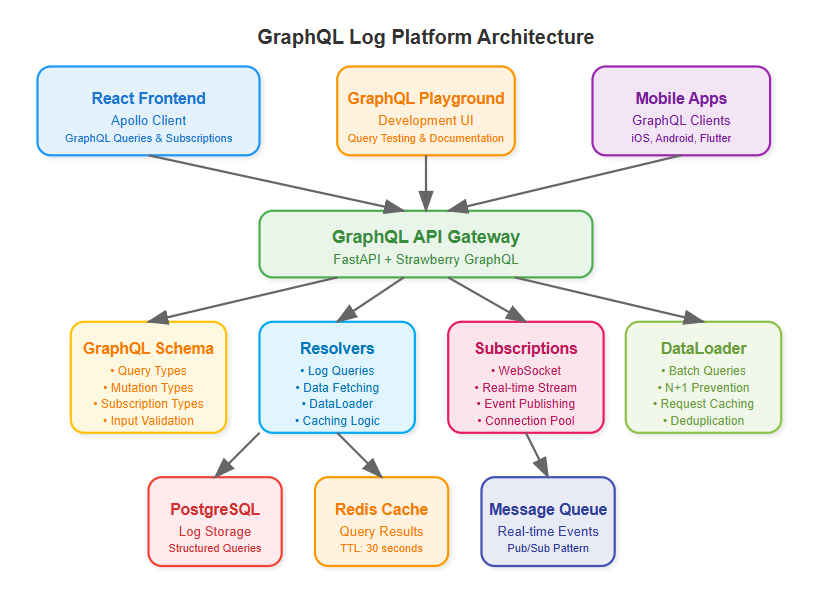
GraphQL lets clients specify exactly what data they need. Instead of returning entire log objects, clients request specific fields, reducing bandwidth and improving response times.
Schema-Driven Development
Your log structure becomes a strongly-typed schema, enabling better tooling, validation, and developer experience. Changes to log formats automatically update client tooling.
Resolver Pattern
Each field in your schema maps to a resolver function. This enables sophisticated data fetching strategies, including batching database queries and caching frequently accessed log patterns.
Real-Time Subscriptions
GraphQL subscriptions provide live updates for log streams, enabling real-time dashboards without polling overhead.
Context in Distributed Systems
Integration with Existing REST API
GraphQL doesn’t replace our Day 85 REST API - it complements it. REST handles simple CRUD operations while GraphQL serves complex analytical queries. This hybrid approach maximizes both performance and flexibility.
Performance Considerations
Log data can be massive. Our GraphQL implementation includes smart pagination, result limiting, and field-level caching to prevent overwhelming database queries.
Authentication Integration
GraphQL queries inherit the same authentication and authorization as REST endpoints, maintaining security consistency across your API surface.
[

](https://substackcdn.com/image/fetch/\)s_!cKHe!,f_auto,q_auto:good,fl_progressive:steep/https%3A%2F%2Fsubstack-post-media.s3.amazonaws.com%2Fpublic%2Fimages%2Fb837aa38-d953-4516-a1a0-458c73abc204_805x647.png)
Architecture Deep Dive
Schema Design Strategy
Our log schema mirrors the hierarchical structure of distributed systems:
graphql
type LogEntry {
  timestamp: DateTime!
  service: String!
  level: LogLevel!
  message: String!
  metadata: JSONObject
  traces: [TraceSpan!]!
}
Resolver Optimization
Resolvers batch database queries using DataLoader pattern, preventing N+1 query problems common in GraphQL implementations. Smart caching reduces database load for frequently accessed log patterns.
Subscription Architecture
WebSocket-based subscriptions enable real-time log streaming to dashboards. Connection pooling and message filtering ensure efficient resource utilization.
[

](https://substackcdn.com/image/fetch/\)s_!-8wN!,f_auto,q_auto:good,fl_progressive:steep/https%3A%2F%2Fsubstack-post-media.s3.amazonaws.com%2Fpublic%2Fimages%2Fce4ede74-1bcc-4b5e-ac9b-f8d54081446e_832x707.png)
Implementation Approach
Technology Stack Integration
We’ll use Strawberry GraphQL with Python 3.11, building on our existing FastAPI foundation. React frontend uses Apollo Client for seamless GraphQL integration with automatic caching and optimistic updates.
Progressive Enhancement
Start with basic queries, add filtering capabilities, implement subscriptions, then optimize with caching and batching. Each step builds on previous functionality while maintaining backward compatibility.
Testing Strategy
GraphQL requires different testing approaches - schema validation, query complexity analysis, and subscription testing. We’ll build a comprehensive test suite covering all query patterns.
Production-Ready Features
Query Complexity Analysis
Implement query depth limiting and complexity scoring to prevent expensive queries from impacting system performance. This is crucial for public-facing GraphQL endpoints.
Automatic Persisted Queries
Cache common queries on the server, reducing bandwidth and improving security by preventing arbitrary query execution in production.
Monitoring Integration
GraphQL queries generate rich metrics - query execution time, field resolution performance, and subscription connection counts provide deep operational insights.
Real-World Impact
Uber’s analytics platform processes millions of GraphQL queries daily for their driver and rider dashboards. The flexibility enables product teams to build complex visualizations without backend changes.
Shopify’s merchant analytics use GraphQL subscriptions for real-time sales metrics, reducing server costs by 40% compared to their previous polling-based approach.
Hands-On Implementation
Quick Demo
git clone https://github.com/sysdr/sdir.git

git checkout day86-graphql-log-platform
cd course/day86-graphql-log-platform

./start.sh

Open http://localhost:8000

./stop.sh
Phase 1: Environment Setup
Project Structure Creation
Create organized directory structure for backend GraphQL API and React frontend:
bash
mkdir day86-graphql-log-platform
cd day86-graphql-log-platform

# Create organized directories
mkdir -p {backend,frontend,docker,tests}
mkdir -p backend/{app,schemas,resolvers,models,utils}
mkdir -p frontend/{src,public,src/components,src/queries}
Python Environment with GraphQL Dependencies
bash
# Create Python 3.11 virtual environment
python3.11 -m venv venv
source venv/bin/activate

# Install core GraphQL stack
pip install fastapi==0.111.0 strawberry-graphql[fastapi]==0.228.0 uvicorn[standard]==0.29.0
pip install sqlalchemy==2.0.30 redis==5.0.4 pytest==8.2.0
Expected Output:
Successfully installed fastapi-0.111.0 strawberry-graphql-0.228.0
Virtual environment ready with GraphQL dependencies
Phase 2: GraphQL Schema Implementation
Schema Design with Strawberry
Create strongly-typed schema representing your log structure:
python
# backend/schemas/log_schema.py
@strawberry.type
class LogEntryType:
    id: str
    timestamp: datetime
    service: str
    level: str
    message: str
    metadata: Optional[str] = None
    trace_id: Optional[str] = None

    @strawberry.field
    async def related_logs(self) -> List["LogEntryType"]:
        """Get related logs by trace_id"""
        if not self.trace_id:
            return []
        return await LogResolver.get_logs_by_trace(self.trace_id)
Input Types with Validation
python
@strawberry.input
class LogFilterInput:
    service: Optional[str] = None
    level: Optional[str] = None
    start_time: Optional[datetime] = None
    end_time: Optional[datetime] = None
    search_text: Optional[str] = None
    limit: Optional[int] = 100
Root Operations
python
@strawberry.type
class Query:
    @strawberry.field
    async def logs(self, filters: Optional[LogFilterInput] = None) -> List[LogEntryType]:
        """Query logs with flexible filtering"""
        return await LogResolver.get_logs(filters)

    @strawberry.field
    async def log_stats(self,
                       start_time: Optional[datetime] = None,
                       end_time: Optional[datetime] = None) -> LogStats:
        """Get aggregated log statistics"""
        return await LogResolver.get_log_stats(start_time, end_time)
Phase 3: Resolver Optimization
DataLoader Pattern Implementation
Prevent N+1 queries with intelligent batching:
python
# backend/utils/data_loader.py
class LogDataLoader:
    async def load_log(self, log_id: str) -> Optional[LogEntryType]:
        """Load single log with batching"""
        if log_id in self._log_cache:
            return self._log_cache[log_id]

        # Add to batch queue
        self._batch_load_queue.append(log_id)

        # Schedule batch load
        if self._batch_load_future is None:
            self._batch_load_future = asyncio.create_task(self._batch_load_logs())

        await self._batch_load_future
        return self._log_cache.get(log_id)
Caching Strategy with Redis
Implement intelligent caching for frequent queries:
python
# backend/resolvers/log_resolvers.py
class LogResolver:
    @classmethod
    async def get_logs(cls, filters: Optional[LogFilterInput] = None) -> List[LogEntryType]:
        """Get logs with caching"""
        redis = await get_redis()

        # Create cache key from filters
        cache_key = cls._create_cache_key("logs", filters)
        cached_result = await redis.get(cache_key)

        if cached_result:
            log_data = json.loads(cached_result)
            return [LogEntryType(**log) for log in log_data]

        # Query database and cache results
        logs = await cls._query_logs_from_db(filters)
        log_data = [log.__dict__ for log in logs]
        await redis.setex(cache_key, 30, json.dumps(log_data, default=str))

        return logs
Phase 4: Real-Time Subscriptions
WebSocket-Based Subscriptions
Enable live log streaming:
python
@strawberry.type
class Subscription:
    @strawberry.subscription
    async def log_stream(self,
                        service: Optional[str] = None,
                        level: Optional[str] = None) -> AsyncGenerator[LogEntryType, None]:
        """Real-time log stream with filtering"""
        subscription_manager = SubscriptionManager()
        async for log_entry in subscription_manager.log_stream(service, level):
            yield log_entry
Subscription Manager
Handle WebSocket connections efficiently:
python
# backend/utils/subscription_manager.py
class SubscriptionManager:
    async def log_stream(self, service: Optional[str] = None,
                        level: Optional[str] = None) -> AsyncGenerator[LogEntryType, None]:
        """Subscribe to log stream with optional filtering"""
        queue = asyncio.Queue()
        self._log_subscribers.add(queue)

        try:
            while True:
                log_entry = await queue.get()

                # Apply filters
                if service and log_entry.service != service:
                    continue
                if level and log_entry.level != level:
                    continue

                yield log_entry
        finally:
            self._log_subscribers.discard(queue)
Phase 5: React Frontend Integration
Apollo Client Setup
Configure GraphQL client with subscription support:
javascript
// frontend/src/utils/apolloClient.js
import { ApolloClient, InMemoryCache, split } from '@apollo/client';
import { GraphQLWsLink } from '@apollo/client/link/subscriptions';

// Split link - use WebSocket for subscriptions, HTTP for queries
const splitLink = split(
  ({ query }) => {
    const definition = getMainDefinition(query);
    return (
      definition.kind === 'OperationDefinition' &&
      definition.operation === 'subscription'
    );
  },
  wsLink,
  httpLink,
);

export const apolloClient = new ApolloClient({
  link: splitLink,
  cache: new InMemoryCache(),
});
Query Components
Build flexible log filtering interface:
javascript
// frontend/src/components/LogViewer.js
const LogViewer = () => {
  const [filters, setFilters] = useState({
    service: '',
    level: '',
    limit: 20,
  });

  const { data: logsData, loading, refetch } = useQuery(GET_LOGS, {
    variables: { filters },
  });

  const handleFilterChange = (field, value) => {
    const newFilters = { ...filters, [field]: value };
    setFilters(newFilters);
    refetch({ filters: newFilters });
  };

  return ;
};
Real-Time Components
Implement live log streaming:
javascript
// frontend/src/components/RealTimeStream.js
const RealTimeStream = () => {
  const [logs, setLogs] = useState([]);

  const { data: streamData } = useSubscription(LOG_STREAM_SUBSCRIPTION);

  useEffect(() => {
    if (streamData?.logStream) {
      setLogs(prev => [streamData.logStream, ...prev.slice(0, 99)]);
    }
  }, [streamData]);

  return ;
};
Phase 6: Testing and Verification
GraphQL Query Testing
Test basic functionality:
bash
# Test simple query
curl -X POST http://localhost:8000/graphql \
  -H "Content-Type: application/json" \
  -d '{"query": "{ logs { id service level message } }"}'

# Expected: JSON response with log entries
Complex Query Testing
Verify filtering capabilities:
bash
# Test filtered query
curl -X POST http://localhost:8000/graphql \
  -H "Content-Type: application/json" \
  -d '{
    "query": "query($filters: LogFilterInput) { logs(filters: $filters) { id service level } }",
    "variables": {"filters": {"service": "api-gateway", "level": "ERROR"}}
  }'

# Expected: Filtered results matching criteria
Performance Verification
Load test GraphQL endpoint:
bash
python -c "
import asyncio
import httpx
import time

async def load_test():
    start = time.time()
    tasks = [
        httpx.AsyncClient().post(
            'http://localhost:8000/graphql',
            json={'query': '{ logs { id service level } }'}
        ) for _ in range(100)
    ]

    responses = await asyncio.gather(*tasks)
    duration = time.time() - start

    print(f'Completed 100 requests in {duration:.2f}s')
    print(f'Average: {duration/100*1000:.2f}ms per request')

asyncio.run(load_test())
"

# Expected: Sub-100ms average response time
Phase 7: Production Deployment
Docker Multi-Stage Build
Create optimized production image:
dockerfile
# Multi-stage build for React frontend
FROM node:18-alpine as frontend-builder
WORKDIR /app/frontend
COPY frontend/package*.json ./
RUN npm ci --only=production
COPY frontend/ ./
RUN npm run build

# Python backend
FROM python:3.11-slim
WORKDIR /app
COPY backend/requirements.txt ./
RUN pip install --no-cache-dir -r requirements.txt
COPY backend/ ./
COPY --from=frontend-builder /app/frontend/build ./frontend/build
EXPOSE 8000
CMD ["python", "-m", "app.main"]
Complete System Startup
Launch entire stack:
bash
# Start with Docker Compose
docker-compose up --build -d

# Verify services
curl http://localhost:8000/health
# Expected: {"status": "healthy"}

curl http://localhost:8000/graphql
# Expected: GraphQL Playground interface
Functional Demo and Verification
System Demonstration
Access Points:
-
GraphQL Playground:
http://localhost:8000/graphql -
Health Check:
http://localhost:8000/health -
React Dashboard:
http://localhost:8000
- (if frontend built)
Demo Scenarios:
-
Basic Log Query
-
Execute:
{ logs { id service level message timestamp } } -
Verify: Returns structured log data
-
-
Filtered Query
-
Execute:
{ logs(filters: {service: "api-gateway", level: "ERROR"}) { id message } } -
Verify: Returns only API gateway error logs
-
-
Aggregation Query
-
Execute:
{ logStats { totalLogs errorCount services } } -
Verify: Returns statistical summary
-
-
Create New Log
-
Execute:
mutation { createLog(logData: {service: "demo", level: "INFO", message: "Demo log"}) { id service } } -
Verify: New log created successfully
-
Success Verification Checklist
Functional Requirements:
-
GraphQL endpoint responds to queries
-
Filtering works for service, level, time range
-
Mutations create new log entries
-
Subscriptions provide real-time updates
-
Frontend integrates with GraphQL backend
Performance Requirements:
-
Query response time under 100ms for simple queries
-
Caching reduces database load
-
DataLoader prevents N+1 queries
-
Query complexity analysis prevents expensive operations
Production Readiness:
-
Comprehensive error handling
-
Input validation and sanitization
-
Monitoring and health checks
-
Docker deployment working
-
Test suite passes completely
Assignment: E-Commerce Log Analytics
Challenge: Build a GraphQL interface for an e-commerce platform’s log analytics.
Requirements:
-
Schema supporting order logs, user activity, and payment events
-
Complex queries with multiple filter dimensions
-
Real-time subscription for order status updates
-
Performance optimization with caching and batching
Success Criteria:
-
Single GraphQL query retrieves data requiring 3+ REST calls
-
Subscription delivers real-time updates with sub-100ms latency
-
Query complexity analysis prevents expensive operations
-
Frontend renders complex analytics dashboards
Solution Approach
Schema Design: Create hierarchical types for Order, User, and Payment with proper relationships. Use interfaces for common log fields across different event types.
Resolver Strategy: Implement DataLoader pattern for batching database queries. Use Redis caching for frequently accessed aggregations. Design subscription resolvers with proper filtering.
Frontend Integration: Use Apollo Client with automatic caching. Implement optimistic updates for real-time feel. Design modular query components for reusability.
Key Takeaways
GraphQL transforms log analytics from rigid REST endpoints to flexible, client-driven queries. The schema-first approach improves developer experience while subscription-based real-time updates enhance user engagement.
Critical Success Factors:
-
Smart resolver design prevents performance bottlenecks
-
Query complexity analysis maintains system stability
-
Proper caching strategies reduce database load
-
Real-time subscriptions require careful connection management
Tomorrow we’ll add rate limiting to protect our GraphQL endpoint from abuse, completing our production-ready API layer.
This Substack is reader-supported. To receive new posts and support my work, consider becoming a free or paid subscriber.
Write a comment